About Bundles Monk
Bundles Monk is a Shopify app for stores that want buyers to take more than one thing at a time: a main product with its natural add-on, or a whole collection a buyer is working through. You describe the offer in the app, and Shopify applies the discount at checkout on its own.
The problem it solves
Most ways of discounting a bundle cost you something. Discount codes have to be found, typed and remembered. A duplicate “bundle” product means a second SKU, its own inventory, and an order line that does not match what you shipped. Draft orders mean a human in the loop.
Bundles Monk does none of that. There is no code to type, no extra product in your catalogue and no draft order. The offer is a rule, and the rule runs inside Shopify’s own checkout.
What it does
The app ships two mechanics.
- Pair bundles. Pick a main product and an add-on. When a cart holds both, the add-on is discounted (or both products, if you choose). One pair is declared per main product.
- Complete sets. Name a set of products, either by pointing at a collection or by picking the products by hand. When the cart holds every item in the set, the order is discounted. Products with several variants can count as one item (any variant) or be expanded so each listed variant is its own collectible.
Each bundle and each set carries its own reward, a percentage off or a fixed amount off, or it can fall back to a store-wide default.
How the discount is applied
The pricing logic is a Shopify Function that Shopify runs itself, on every cart change, inside checkout. The app registers one automatic app discount pointing at that function on your first visit to the admin, and from then on the discount is a native Shopify discount like any other.
For you, that means:
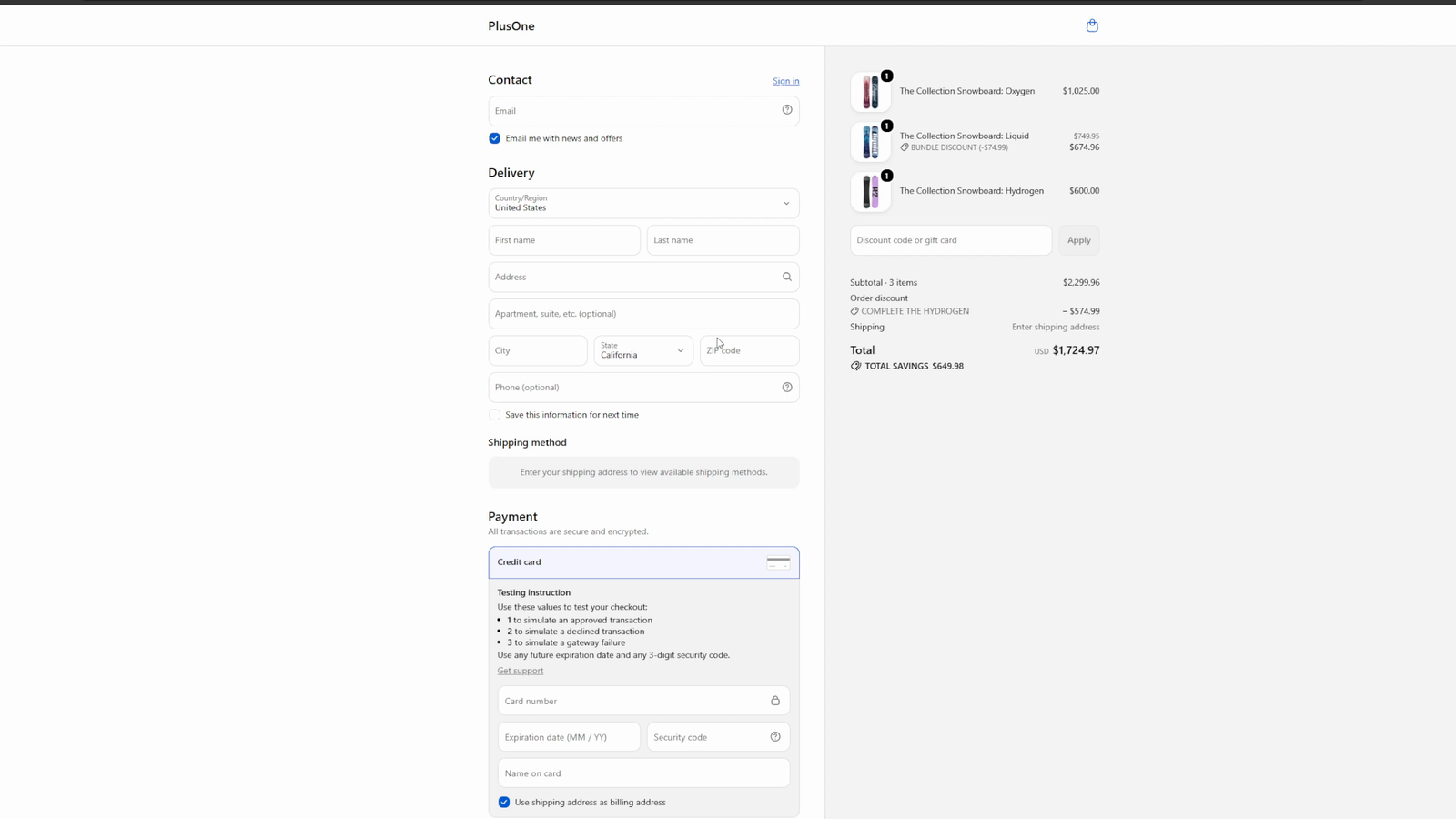
- It is a real Shopify discount. It shows in the cart and in checkout, it appears on the order and in Shopify’s own discount reporting, and it needs no code.
- Nothing is duplicated. No bundle product, no second SKU, no draft order. The buyer buys the same products they would have bought anyway, at a lower total.
- The buyer sees it where they expect it. A pair bundle appears as a line discount against the discounted product. A complete set appears as an order discount labelled with the set’s name.
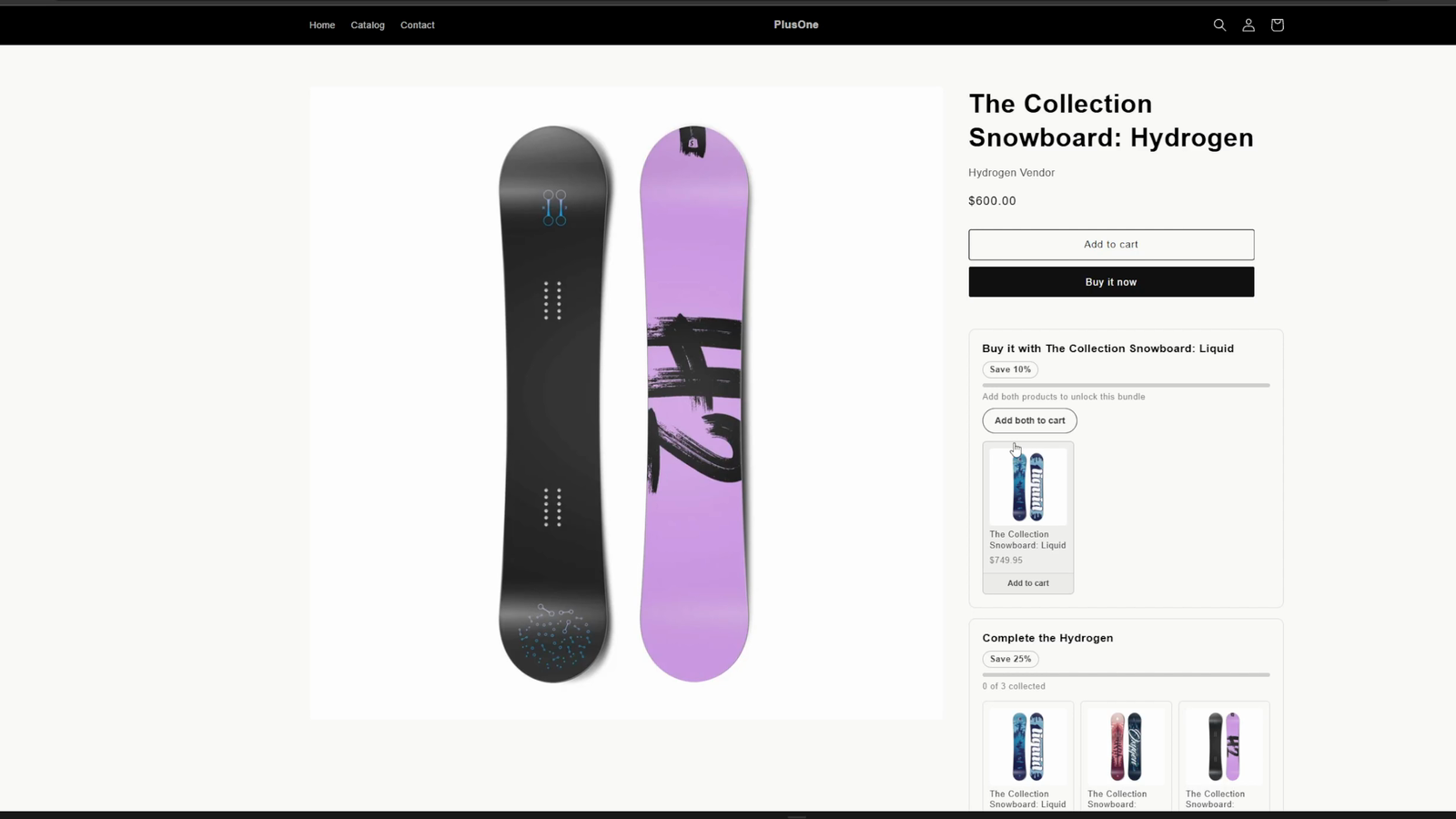
The storefront side is a theme app block you drop onto your product template. It shows the offer, what is still missing, a progress count, and an add-to-cart button for the missing items. It is optional: the discount applies whether or not the block is on the page, but without it a buyer has no way of knowing the offer exists.
Who it suits
Stores selling things people collect or complete: a range that comes as a series, a base product with a matching accessory, a starter item with its refill. It suits merchants who are comfortable picking products in an admin and want the discount handled for them, rather than merchants who want to build a bundle page.
What it deliberately does not do
- It does not create bundle products. There is no combined SKU, no fixed-price kit, and no inventory of its own.
- It does not take payments or touch orders. It does not request the order or customer access scopes, so it cannot see who bought what.
- It has no checkout UI extension. The storefront block lives on the product page only, not in the cart drawer, the collection page or checkout.
- It has no analytics dashboard. Discount performance is read in Shopify’s own reports.
- Complete sets do not stack with each other. If two sets complete in one cart, Shopify keeps whichever is worth more to the buyer.
Requirements and limits
- Checkout has to be the extensible checkout. Shopify Functions do not run on the legacy
checkout.liquid. - The storefront block needs an Online Store 2.0 theme whose product template accepts app blocks. The block is restricted to product templates. Themes that cannot take app blocks still get the discount at checkout, they just cannot show the promo card.
- The app’s discount is set to combine with product discounts and with shipping discounts, and not with other order discounts. Shopify only combines two discounts when both of them are set to combine with the other’s class, so the other discount has to allow it too.
- Plan limits apply to how many bundles and sets you can run at once. See the App Store listing for current pricing and plans, and the limits page for the ceilings that apply on every plan.
The tutorial walks from install to a discount visible in a test checkout. The documentation covers each feature area in detail.
Who builds it
Bundles Monk is built and run by Ioun Developers. Support goes to hello@ioun.dev.